Create and combine bodies
Choose operations by their geometric purpose, then inspect their typed inputs in the current catalogue. The names below are feature-operation IDs inside a design document; they are not independent HTTP endpoints.
Family |
Operations |
Typical application |
|---|---|---|
Primitives |
|
Envelopes, passages, bosses and starting volumes |
Curves |
|
Positions and sweep paths |
Profile operations |
|
Prismatic bodies, rotational parts and circular passages |
Booleans |
|
Join material, remove a passage, trim to an envelope |
Wall operations |
|
Clearances, thickness and hollow bodies |
Placement |
|
Positioning and repeated features |
Spatial modification |
Discover twist, taper, clipping and axis-scaling operations |
Controlled shape variation |
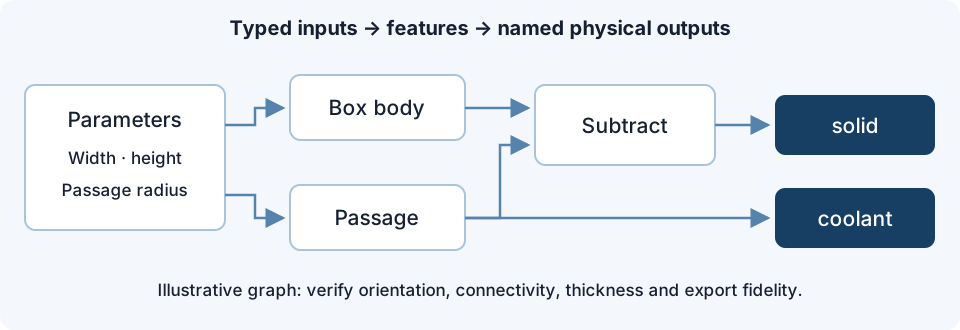
An illustrative feature graph with separate solid and coolant outputs.
Example: a passage through a block
Create a box for the material and a cylinder for the passage. Orient the cylinder along the intended flow path, extending it through the material. Subtract the passage body from the box. Keep the passage as a separate named fluid output when preparing an explicit fluid/solid assembly for CHT.
Inspect a section: the passage must be open at the intended ports, continuous, and separated from neighbouring passages by the required wall thickness. A subtraction that looks correct from outside may still contain an unintended blind end.
Blends and shells
Boolean operations can expose blending controls. A blend changes geometry near the junction; it is not merely a display smoothing option. Recheck envelope dimensions, minimum thickness and fluid cross-section after applying it. Use the declared blend choices and units from the catalogue.
An offset or shell can collapse narrow features or close a small gap. Check both inward and outward surfaces and the sign convention of the selected operation. For thin features, compare section views and exported geometry at adequate resolution.
Pattern count, spacing and overall extent should be explicit. Increasing a count can change connectivity and export cost. Do not assume that a valid graph guarantees nonintersecting instances or a meshable physical volume.